ラベル Cool toys (in English) の投稿を表示しています。 すべての投稿を表示

2007/01/17

[Cool toys] Tablet PC (2)-- Manage your reprints electronically

This post has been relocated to http://gawkysblog.blogspot.com.

Most practicing scientists are inundated with countless piles of photocopies and reprints. Since my chosen field is neuroscience, the situation is particularly acute; given that neuroscience is a complex patchwork of many disciplines, the nature of the field defies any simplistic effort towards classification/filing. I also have random reprints that I've accumulated as a medical student; this only complicates the mess. Furthermore, scientific literature is multiplying steadily in accordance with de Solla Price's exponential law; the paper mess can only become worse in the future.


I have been addressing this problem by turning completely to PDF files on my tablet computer. Even old reprints, not available in electronic format, have been scanned. The tablet allows me to scribble, just as if I had a physical copy in front me.

I calculate that
(A) the time saved (no need to fish through piles, or re-copy lost papers) and
(B) the convenience (I have my whole library with me at all times, and it can be backed up)
more than justify the initial investment.

I use a combination of the following software packages...
  • Reference Manager... this package allows me to maintain a sorted database of my references. The user interface is somewhat more to my liking than EndNote, especially because it allows fine-tuning of the display screen. I use a custom user-defined field to categorize my papers into little "piles," and by sorting with this field, I can browse through these piles in the main window.

  • Ideally, I would like to switch to JabRef, which is an open-source Java database program based on BibTeX, but the lack of easy bibliography management in MS Word keeps me from switching. JabRef has a very useful categorization scheme, based on a directory-like tree structure (see upper left panel in screenshot); links from each reference can be dragged to multiple nodes on the tree, which is ideally suited for the multidisciplinary nature of neuroscience.

  • PDF Annotator... Clicking on the Reference Manager entry brings up this software, with the PDF in question. The old version of Adobe Acrobat responded too slowly to pen input for scribbling hand-written notes. I haven't tried Acrobat v.8, but presently, I am quite happy with this shareware package. In combination with the tablet PC, it allows you to scribble and highlight your PDF files, just as if you had a real copy before you. Currently, it does not support text highlighting (i.e. you must carefully trace your pen over the line to highlight) or text copying, and you cannot type in comments.

2007/01/09

[Cool toys] Tablet PC (1)-- Dissecting the tablet pen

This post has been relocated to http://gawkysblog.blogspot.com.

I've been a tablet PC user (Toshiba Protege M200) for over a year now. The tablet is an amazing piece of engineering; it allows you to write directly on the laptop screen, as if it were a piece of paper. The digitizer pen writes like a smooth felt-tip. It even senses your writing pressure at 8 bit resolution, so in some graphics programs, if you press harder, you get a thicker line.

How does it work?

The digitizer pen has no power source, and is just an RLC circuit that resonates at a certain frequency-- this resonant frequency is modified by the pen pressure and by button presses.

To read the location of the pen, the tablet first sends out a pulsed radio wave (68 kHz) through an antenna array which is embedded in the screen. This is recieved by the pen's circuitry, which resonates at a given frequency. Next, the tablet switches to antenna mode, and senses where on its antenna array the resonating pen is located. It apparently does this 500 times a second.

One of the few complaints that I have with the Toshiba unit is the ridiculously cheap digitizer pen. It's way too light, and feels like a cheap plastic ballpoint--which is not what you'd expect from an expensive unit.

This cheap digitizer pen broke on me recently, and I guess the least I can do is to post a photo for those who might be interested but don't want to destroy their pen for curiosity's sake. (The photo shows circuitry from the top part of the pen, which acts as an eraser. I imagine that another circuit exactly like it is embedded in the tip as well.)

Links

2007/01/05

[Cool toys] A perfect website for the Japanese art of book-living

Like all great cultural traditions in Japan, being a person of letters is steeped in its own set of highly refined formalisms and rituals. Formalism in Japanese culture allows simple acts to be perfected, with beauty originating not from embellishment, but from subtraction down to the very essence. Thus, the tea ceremony is a reduced version of drinking tea, but simultaneously, it is so much more.

Being a person of letters, or shosei, is no different. "Sho" is the kanji for books (and writing), "sei" is the kanji for life and living. One traditional prototype of a practitioner of "book-living" is that of a young man living in a small room of his patron's house, working as a live-in tutor to the children of the house. The shosei will traditionally own only one suit, which he wears whenever he goes out. At home, he will wear a simplified kimono. He also owns a decent fountain pen and a functioning timepiece. Everything else is non-essential... except for the books.

Prototypes aside, here, I will take some liberties and use the word shosei in a somewhat broader sense; the unifying concept is a lifestyle devoted to learning, while shunning (or having no means to) material wealth other than books.


Books are the core of shosei-life-- however, life in Japan is antithetical to owning books.

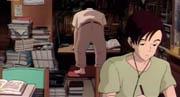
First of all, with so many people living in a small archipelago, spacious rooms devoted to bibliophilia are impractical. The real estate economics of a cultural city like Tokyo or Kyoto can be overwhelming, especially for a poor shosei. The illustration is taken from a Miyazaki animated movie, "Whisper of the Heart." The father of this family is a librarian, the mother goes to graduate school, and the girl is a regular shosei-in-training. Notice the books.

Second, there is the mold. Japan is mostly tropical, with a month-long rainy season in June. Books, especially when kept in tight quarters, tend to get extremely moldy. Winter is quite dry though, and this constant cycle of wet and dry can cause pages to wrinkle like lasagna.

Even given these impediments to owning books, books are an essential part of being a shosei. A partial solution to this conundrum may be upon us in the form of a website, www.librarything.com.


This website allows you to keep a database of the books you own. You can apply multiple tags to the books to categorize them, write reviews, etc. Most satisfying to the shosei is that it allows you to keep track of the number of books in your growing library. Just as military men like to gather stripes on their lapels, shosei like to sport large libraries (shosei aren't immune from the mine-is-bigger-than-yours impulse).

The most revolutionary function is that it allows you to view the libraries of people who own similar books. You can also solicit recommendations from the database, based on what similarly-minded people own.

Shosei are always faced with the need to get rid of books. Otherwise, there may be no place to put your futon, and being smothered by books during the next earthquake is not appealing either. Perhaps keeping books virtually at this website may be a partial substitute.

Some books, of course, you can never throw away. Furthermore, I have noticed that using this website can stoke bad book-buying binges. However, I hold hope in the possibility that this website will let me get rid of less important books, while still enjoying the age-old art of book-living.


Links
How to live as a poor shosei (in Japanese)

2006/11/26

[Cool toys] Synergy-- open source network KM sharing

I have two machines running at work-- a Dell desktop (SUSE Linux 10.1) and my Toshiba Protege tablet PC. The tablet sits on a docking station so that its LCD is right next to the desktop monitor. I've been sharing a single keyboard between them with a cheap PS/2 KVM switch for a year, but recently, the switch seemed to act up from time to time. Besides, I've deleted some important stuff by mistake, mea culpa, by forgetting to switch and typing into the wrong computer.

That's why I was delighted to discover a great open source package: Synergy. With Synergy, you can easily share your keyboard and mouse-- and your clipboard too, over a network connection. They have sharing clients and sharing servers for Win, OSX and X11(UNIX/Linux).

Setup took some time to figure out, especially on the Linux side. The configuration scripts were straightforward but took some reading of the documentation (all very good) on the Sourceforge page, to get it all just right. I also had to figure out how to punch a hole in the SUSE firewall. Setup on the Windows side was very simple b/c of the graphical interface they provide.

Once setup was over, everything worked perfectly. The switching is seamless-- you just move your mouse from one screen to the other as if you had a dual monitor setup. When run across my 10/100 firewall-router, there is absolutely no delay in keystrokes or mouse movements. The clipboard sharing is especially convenient, although it only carries plain text. The setup has performed pretty consistently all this week.

The only worry, I guess, is security. I'm hoping it's fairly safe since I'm local and behind a firewall... Aside from this worry, however, the only complaint I have is that I wish I had found this software earlier!